Best Practices for Nightclub Guest List Management
Centralize guest data, use digital RSVPs and QR check-ins, manage no-shows and monitor capacity to improve VIP service and revenue.
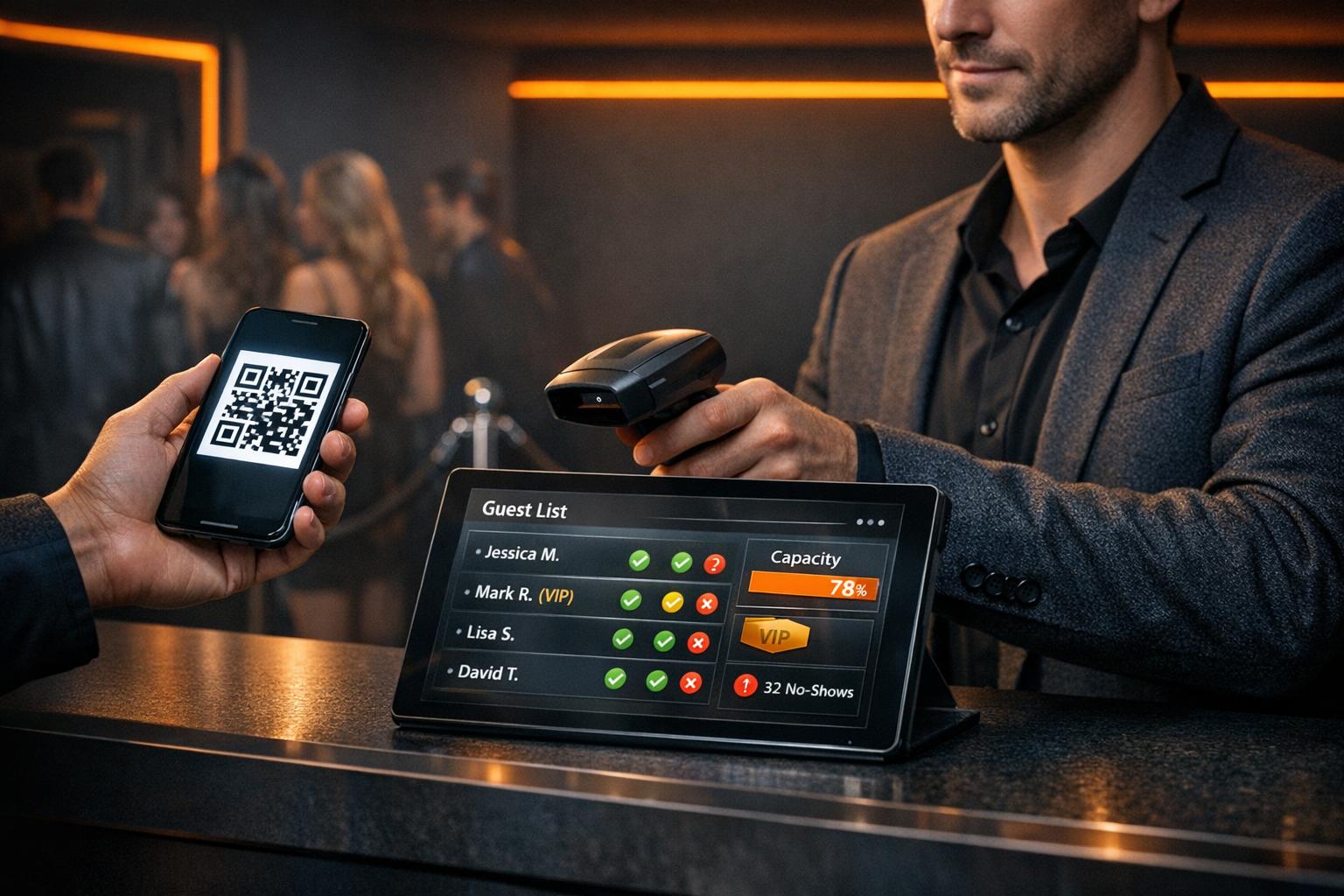
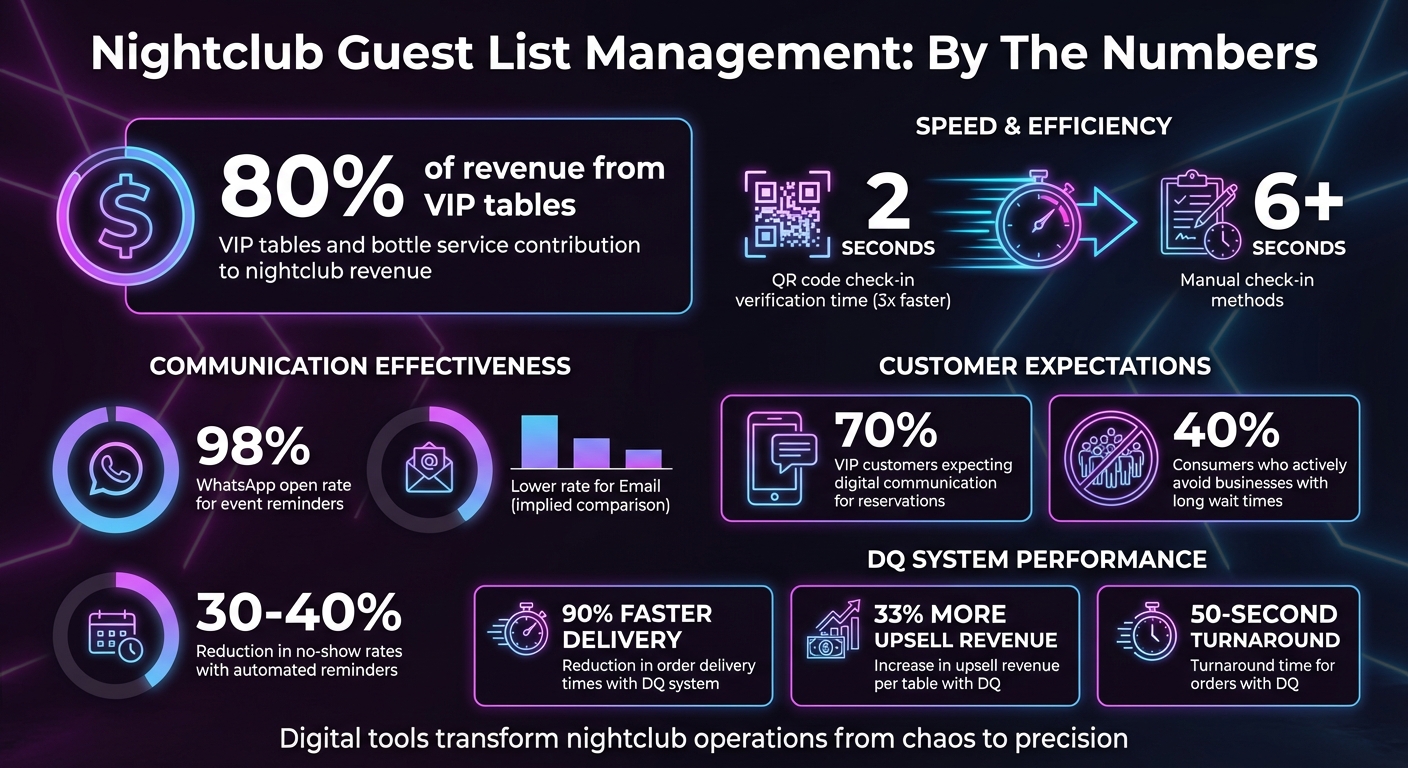
Managing a nightclub guest list effectively is critical for ensuring smooth operations and maximizing revenue. VIP tables and bottle service can contribute up to 80% of a nightclub's income, making an organized system essential. Here’s the key to success:
- Centralize Guest Data: Use a single database to store detailed information like names, IDs, contact details, preferences, and spending habits.
- Leverage Digital Tools: Implement searchable, real-time systems for RSVP management, check-ins, and capacity tracking.
- Streamline Check-Ins: Use QR codes, mobile apps, or self-service kiosks to reduce wait times and improve accuracy.
- Plan for No-Shows: Send automated reminders and maintain a waitlist to fill empty spots.
- Analyze Post-Event Data: Review attendance, spending, and promoter performance to improve future events.
Efficient guest list management isn't just about keeping things organized - it directly impacts customer experience and profitability. Digital tools like DQ: The System for Bottle Service simplify VIP bookings and provide actionable insights to elevate operations.
Nightclub Guest List Management: Key Statistics and Best Practices
Build and Maintain a Centralized Guest Database
A centralized guest database is the backbone of managing nightclub guest lists effectively. Without it, juggling scattered spreadsheets, texts, and notes can lead to missed VIPs and unnecessary delays. A single, well-organized database ensures that all guest data is instantly accessible and accurate. This eliminates confusion, speeds up operations, and supports smoother processes like digital invitations and check-ins.
Collect Detailed Guest Information
Don't stop at just names and phone numbers. Gather comprehensive guest details like full names, valid IDs, and birthdays. These not only verify entry but also enable age-restricted marketing efforts. Contact details such as email addresses and phone numbers allow for automated RSVPs, reminders, and targeted SMS campaigns. Dive deeper into preferences - favorite drinks, seating choices, and music genres - to create personalized experiences that keep guests coming back.
Tracking behavioral data can reveal who your most valuable guests are. Metrics like attendance frequency, total spending, and average spend per visit help identify high-value regulars who deserve VIP-level attention. Capturing group dynamics, such as plus-ones or typical group sizes, can also help you manage capacity and entry rules more efficiently. A dedicated Notes section is perfect for logging qualitative insights like special requests or preferred servers.
| Information Category | Specific Data Points to Collect | Purpose |
|---|---|---|
| Identity | Full Name, Valid ID, Birthday | Entry verification and age-restricted marketing |
| Contact | Email, Mobile Number | Automated RSVPs, reminders, and targeted SMS |
| Preferences | Favorite Bottles, Seating Area, Music | Personalized service and table assignments |
| Engagement | Attendance History, Total Spend, No-show Rate | Identifying VIPs and predicting revenue |
| Source | Promoter Name, Referral Channel (IG/Web) | Evaluating promoter performance and ROI |
With these detailed guest profiles, you can take advantage of digital tools to elevate your operations.
Use Searchable and Filterable Tools
Digital tools with search and filter functions make it easy for door staff to quickly locate guests by name, list type, or event. This reduces wait times and keeps the entry line moving. Automated tagging helps segment guests based on behaviors - VIP status, preferred music, event attendance, or special occasions like birthdays - so you can communicate with precision.
Cloud-based systems add mobile accessibility, enabling staff to access guest profiles from any device, anywhere in the venue. Choose tools that sync seamlessly with web-based RSVP forms to eliminate manual entry errors. For even greater efficiency, integrate your guest database with your Point-of-Sale system. This allows you to track real-time spending and automatically flag when VIP tables meet their minimums. The result? Faster service, sharper insights, and smoother operations from the entrance to the dance floor.
sbb-itb-b384c58
Digital Invitations and RSVP Management
Digital invitations make RSVP management a breeze when paired with a centralized database. Once your database is set, you can send out digital invites that simplify responses, cut down on manual tasks, and ensure accurate guest counts. Be sure to include all the key event details - like the date, arrival deadlines, and dress code - along with an RSVP link optimized for mobile devices and optional calendar integration.
"The RSVP page is often your guest's first real interaction with the event - it should feel like a natural extension of your brand, not a generic form." - Magnetiq
Keep the RSVP process straightforward. Don’t ask for details already stored in your database, as this can frustrate guests and lead to incomplete responses. To manage capacity, include a controlled plus-one option. When sending invitations, use an authenticated email domain with DKIM validation to avoid spam filters and improve delivery rates. For high-profile attendees, consider copying or blind-copying their personal assistants to ensure the invite reaches them. These digital tools not only streamline planning but also enable more tailored communication.
Personalize Invitations and Automate Follow-Ups
Generic mass emails are a missed opportunity. Instead, use merge tags to personalize each invitation with details like the recipient’s name or past attendance, giving it a more personal touch. Set an RSVP deadline to allow time for follow-ups, and automate reminders to gently nudge guests. For instance, send a reminder one week before the deadline and a final alert 24 hours prior to create a sense of urgency. Multi-channel communication - through email, SMS, or WhatsApp - can further boost the chances of your message being seen.
Once a guest RSVPs, send an automated confirmation that feels polished and professional. Include a personalized QR code or an Apple/Google Wallet ticket for quick check-in. To build anticipation, you might also add event teasers, like a sneak peek at the DJ lineup or a signature cocktail menu. A final reminder with check-in details sent a week before the event keeps your event fresh in guests’ minds and helps minimize no-shows.
After customizing your invitations, segment your guest lists for targeted messaging.
Segment Guest Lists for Targeted Communication
Organize your guest list into categories such as VIPs, press, sponsors, promoters, or general admission. This way, you can tailor messaging to match each group’s role. Use functional tags like "Green Room Access", "Drink Tokens", or "AAA" (Access All Areas) to highlight perks or entry permissions that staff can easily identify. Additionally, filter your list by RSVP status - confirmed, pending, or declined - to ensure follow-ups go only to those who haven’t responded yet. This keeps your communication focused and professional.
Optimize the Check-In Process
A smooth check-in process can set the tone for the entire event. Long lines at the entrance not only frustrate guests but can also slow down operations. In fact, 40% of consumers actively avoid businesses with long wait times. So, investing in tools that offer both speed and accuracy isn't just about convenience - it's a way to safeguard your reputation and revenue.
Combine speed with accuracy: QR code scanning can verify guests in under 2 seconds - three times faster than manual methods. When guests receive their unique QR codes via email or SMS, they can save them to their Apple or Google Wallet for quick access at the door. This eliminates the hassle of paper lists or scrolling through spreadsheets, allowing door staff to process entries in seconds.
For those without QR codes, a digital guest list with a name search and one-tap check-in is a great alternative. Cloud-based systems ensure that check-ins at one entrance automatically update across all other entry points in real time. This synchronization prevents confusion about who has already entered and ensures that your entire team is on the same page.
Implement Real-Time Check-In Tools
Mobile scanning apps can turn any smartphone into a high-speed scanner, even in offline mode. For larger events, self-service kiosks let guests scan their own codes and print wristbands or badges, freeing up staff to focus on more critical tasks. Additionally, automated SMS or email alerts can notify management the moment a VIP or high-profile guest checks in, ensuring they receive immediate, personalized attention.
Monitor Capacity and Guest Arrivals Live
Managing guest flow goes beyond individual check-ins - it’s about keeping an eye on the bigger picture. Real-time dashboards offer instant updates on guest arrivals, pending check-ins, and traffic at each entrance. This live data is essential for maintaining compliance with fire marshal limits and avoiding overcrowding. Systems that track both check-ins and check-outs provide an accurate, real-time occupancy count, which is vital for ensuring safety regulations are met.
Dynamic dashboards also allow you to reassign staff on the fly. For example, if one entrance becomes overwhelmed while another is quiet, you can shift door staff to where they’re needed most. Capacity threshold alerts and timed entry slots can further control guest flow and prevent surges during peak hours. Enforcing arrival cutoffs - like requiring guests to arrive by 11:30 PM - can also help avoid dangerous bottlenecks. Plus, this data doubles as a compliance audit trail.
"A strong event check-in solution provides dashboards. This dashboard makes decision-making easier during live events." - Raghav Ojha, Content Writer, Dreamcast
Use DQ for VIP Bookings and Guest List Management
DQ: The System for Bottle Service is designed to simplify VIP management, building on the foundation of digital check-in and database tools. This system helps streamline operations and boost profitability by addressing common challenges in managing high-profile guests.
Picture a packed Friday night where staff juggle VIP bookings, table assignments, and guest lists manually. It’s a recipe for delays and confusion. DQ eliminates this chaos by consolidating all aspects of VIP service - orders, bookings, payments, communication, and even incident handling - into one unified platform (). This creates a single, reliable source of information, ensuring everyone on the team is on the same page.
Manage Table Guest Lists with Ease
DQ allows you to gather detailed guest information ahead of time, confirming VIP table guest lists before they even arrive (). This pre-event preparation simplifies data management and ensures smoother operations during the event. Once the night begins, staff can track bookings and spending in real time. The results? Faster service and increased revenue. DQ users report order delivery times reduced by 90%, upsell revenue per table boosted by 33%, and turnaround times as quick as 50 seconds ().
"Our turnaround time was a max of two minutes for every order, that just wouldn't have been made possible without DQ for us." - Nev, Billboard ()
With these tools, managing bookings becomes more efficient, setting the stage for smarter guest insights.
Integrate Guest Data for Better Insights
DQ doesn’t just handle the night-of logistics - it also collects and analyzes guest and operational data to help you refine your approach (). It tracks metrics like guest lifetime value, visitation patterns, and preferences that traditional systems often overlook (). This data reveals which promoters bring in top-tier guests, identifies peak booking times, and flags tables with high no-show rates. Armed with these insights, you can make informed decisions about marketing strategies, staffing levels, and inventory needs. The result? A better experience for your guests and stronger profitability for your venue.
Plan for No-Shows and Overbooking
No-shows are a reality in nightclub operations, but they don't have to disrupt your revenue. By combining digital check-in tools with centralized databases, you can keep tables filled and avoid guest overflow. The secret lies in proactive, data-driven planning that ensures a smooth experience for everyone.
Account for Typical No-Show Rates
No-shows are common, especially on guest lists. But instead of letting empty tables eat into your profits, use automated reminders to cut down on absences. Sending reminders 48 hours, 24 hours, and 2–3 hours before an event can lower no-show rates by 30–40%. WhatsApp is particularly effective for this, boasting a 98% open rate compared to traditional email.
Make sure these reminders include one-click cancellation links. When guests cancel ahead of time, you can reassign their spots to waitlisted patrons. Plus, tracking response rates to these reminders gives you a heads-up on potential no-shows. This real-time data allows you to adjust capacity as needed during the event. With accurate headcounts from these updates, managing your venue's capacity becomes far less stressful.
Use a Single Source of Truth
A centralized database isn't just a convenience - it’s essential for managing overbooking and no-shows. By keeping all team activities synchronized in one place, you can avoid double bookings and reduce miscommunication.
Establish firm cutoff times for guest list entries - many clubs set this at 11:30 PM or midnight - to help finalize headcounts before peak hours. Using a unified platform to centralize guest data ensures smoother operations and eliminates confusion. Real-time visibility is especially critical for VIP tables, which can account for up to 80% of revenue in upscale venues. This level of coordination keeps your operations running like clockwork while maximizing your earnings.
Review Post-Event Analytics for Continuous Improvement
Post-event analytics are a game-changer when it comes to refining your strategy for future events. Once the night wraps up, the data you've collected becomes an invaluable tool for identifying what worked, what didn’t, and how to make the next event even more successful. By translating observations into actionable strategies, you can boost profits and streamline operations.
Analyze Attendance and Trends
Start by examining attendance patterns in relation to your venue's capacity. Key metrics like total headcount, door entries, and arrival times provide insights into how to optimize staffing and manage entry flow.
Take note of peak entry times, top-selling items, and how your attendance compares to capacity. This summary helps you adjust operations for smoother nights and better customer experiences.
Evaluate Promoter Performance
Promoters play a crucial role, but not all of them bring the same value to the table. Dive into detailed reports to compare no-show rates and guest spending. For example, if one promoter brings in 50 guests but their overall spending is less than another promoter’s 30 guests, the data makes it clear where your focus should shift.
Use CRM data to track repeat visit rates and guest arrival patterns. This information helps you fine-tune door flow, staffing, and promotional efforts. Platforms like DQ make this process easier by automatically tracking referral sources, spending habits, and attendance trends.
For perspective, industry data reveals that email marketing in nightlife can deliver an average ROI of $42 for every $1 spent. Armed with these insights, you can make smarter decisions about promoter partnerships and allocate your marketing budget more effectively. The result? Improved promotional strategies and better event outcomes, creating a seamless cycle of planning, execution, and review.
Conclusion
Managing a guest list effectively has evolved far beyond pen-and-paper methods. Today, it’s all about speed, organization, and leveraging smart technology. For high-end nightclubs, where VIP table and bottle service can account for up to 80% of total revenue, precision in guest management isn’t just helpful - it’s essential.
Digital tools have transformed the way venues operate, replacing chaotic paper lists with real-time updates and automation. Features like automated SMS confirmations, QR code scanning at the entrance, and live capacity monitoring not only streamline operations but also allow staff to focus on providing exceptional service. As GuestQueue aptly puts it, "The faster guests get through the line, the faster they're inside and enjoying everything your club or event has to offer!"
For venues looking to take their VIP service to the next level, integrated systems are a game-changer. DQ: The System for Bottle Service offers an all-in-one platform that combines table bookings, payments, and detailed guest data. This seamless integration provides clear insights into guest preferences and spending habits, ensuring a personalized experience. With 70% of VIP customers now expecting digital communication for reservations and service, adapting to these expectations is not just smart - it’s necessary to stay competitive.
FAQs
What guest info should I collect besides names?
When collecting guest information, don’t just stop at names. Make sure to gather contact details like phone numbers and email addresses. Additionally, jot down any preferences, VIP status, or special requests they might have. This extra effort helps you deliver a more tailored experience and leaves a lasting impression.
How do QR codes speed up nightclub check-in?
QR codes make nightclub check-ins a breeze by enabling quick, contactless scanning of each guest's unique code. This approach cuts down on wait times and removes the hassle of manual guest searches or physical interactions, creating a faster and smoother experience for both staff and attendees.
How can I reduce VIP table no-shows without overbooking?
Requiring prepayment or deposits for VIP table reservations is a smart way to ensure guests are committed to showing up. It not only secures their spot but also minimizes the risk of no-shows. Be upfront about your reservation policies - clearly outline cancellation or modification deadlines so there are no surprises.
Additionally, take advantage of digital tools to streamline the process. These tools can help you manage guest lists, track RSVPs, and send timely reminders. Together, these strategies improve attendance rates, cut down on last-minute cancellations, and keep your operations running smoothly.