Best Practices for Staff Messaging in Nightclubs
Protocols for fast, clear staff communication in noisy nightclubs — radios for urgent tasks, texts for non-urgent updates, emergency codes, and pre-shift briefings.

Nightclubs are chaotic environments where effective communication is critical but challenging due to noise, dim lighting, and high-pressure operations. Poor messaging can lead to missed VIP arrivals, service delays, and lost revenue. Here’s how to fix it:
- Use the 5 C's of Messaging: Clear, concise, correct, complete, and courteous communication prevents service errors.
- Leverage Real-Time Tools: Alerts should be bold yet brief, with role-based routing to avoid overwhelming staff.
- Radio Protocols Matter: Follow structured communication like identifying sender/recipient and confirming receipt with terms like "Roger" or "Wilco."
- Combine Radios and Digital Tools: Radios for urgent needs; text or digital platforms for non-urgent updates like schedules.
- Emergency Code Systems: Use discreet codes to handle incidents without alarming guests.
- Centralize Communication with Tools like DQ: Platforms like DQ streamline tasks, track orders, and improve VIP service coordination.
- Pre-Shift Briefings: Align teams on goals, messaging protocols, and emergency plans in 5–15 minutes.
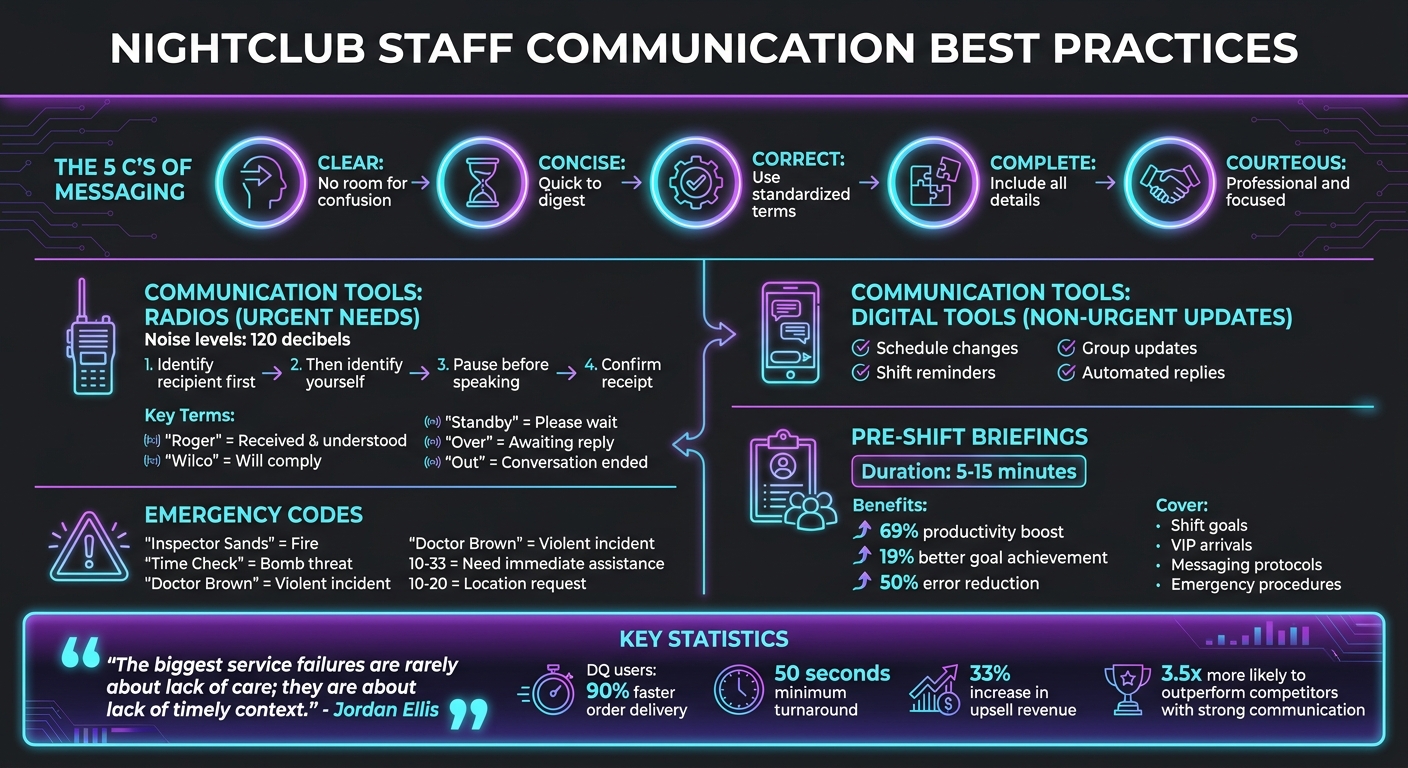
Nightclub Staff Communication Best Practices Framework
Core Principles for Staff Messaging in Nightclubs
Nightclub communication thrives on clarity, especially in spaces where noise levels can hit 120 decibels. To ensure smooth coordination in these chaotic environments, messaging protocols are designed to cut through the noise and keep operations seamless.
The 5 C's of Messaging: Clear, Concise, Correct, Complete, Courteous
Effective communication among staff hinges on five key principles: clear, concise, correct, complete, and courteous. These elements work together to prevent service mishaps and maintain strong guest relationships.
- Clear: Messages should leave no room for confusion. Provide specific instructions to guide actions effectively.
- Concise: Information needs to be quick and easy to digest, enabling staff to act swiftly.
- Correct: Use standardized terms to ensure accuracy. For example, saying "shellfish allergy" instead of a vague "dietary restriction" can prevent serious errors.
- Complete: Include all relevant details. For instance, a VIP alert should specify the guest’s name, table number, bottle preferences, and any special requests. Ensure every message is acknowledged, assigned, and resolved to avoid overlooked tasks.
- Courteous: Keep communications professional and focused, steering clear of unnecessary personal remarks.
"The biggest service failures are rarely about lack of care; they are about lack of timely context."
- Jordan Ellis, Senior Hospitality Technology Editor, Pubs.club
These principles are the foundation of efficient communication systems that support the fast-paced, high-pressure demands of nightclub operations. When applied consistently, they not only streamline workflows but also pave the way for more advanced tools to enhance staff performance.
Using Real-Time Messaging Without Disrupting Service
Once the fundamentals of messaging are in place, real-time alerts can be integrated to improve service without causing unnecessary interruptions. The goal is to refine how information is delivered while maintaining operational flow.
The concept of glanceability is crucial - alerts should be bold and brief, allowing staff to absorb key details quickly and stay focused.
To prevent information overload, use tiered alerts. Critical updates, such as severe allergies or VIP arrivals, should be sent immediately to the relevant team members, while routine updates can appear as less disruptive dashboard notifications. Role-based routing ensures that only the appropriate staff receive specific messages - like hosts getting arrival alerts, bartenders seeing order changes, and managers being notified of tab adjustments.
Regular 30-minute check-ins for team leads can help coordinate updates without relying on constant, ad hoc messaging.
"Real-time tools should get sharper over time, not noisier."
- Jordan Ellis, Senior Hospitality Technology Editor, Pubs.club
Clear documentation is another must. When staff take actions - like preparing extra stock or batching cocktails for the next shift - they should log these updates in a shared system. This ensures their efforts are recognized and keeps the team ready for what’s next.
sbb-itb-b384c58
Radio Communication Guidelines
In noisy nightclub environments, clear and immediate communication is essential. While digital alerts play a role, standardized radio protocols are the backbone of effective coordination. With noise levels often surpassing 85 dB - the OSHA threshold for hearing protection - these protocols ensure messages are understood, even amidst chaos.
Identifying Yourself and Your Recipient
When using radios, always begin by stating who you are calling followed by who you are. This structure helps the recipient immediately determine if the message is for them. For instance: "Security, this is Front Door, over". Role-based call signs like "Bar Manager", "Base", or "Unit 5" enhance professionalism and streamline communication. This coordination is especially vital when building VIP teams for high-end bottle service environments.
To avoid clipped transmissions, press the Push-to-Talk (PTT) button, pause for a second, and then speak. Before transmitting, listen briefly to ensure you’re not interrupting an ongoing conversation. If a message isn’t clear, use "Say Again" instead of "Repeat", as the latter is reserved for emergency-specific protocols.
"The standard procedure is to state who you are calling first, followed by who you are. For example: 'Base, this is Unit 5, over.' This structure helps the listener immediately know if the message is for them."
- Mobile Systems
Once identified, promptly confirm receipt to maintain a smooth communication flow.
Confirming Message Receipt
Acknowledging messages with standardized responses minimizes confusion. Use "Roger" to indicate you’ve received and understood the message. For instructions you’ll act on, respond with "Wilco" (short for "Will Comply"). For informal acknowledgments, "Copy" or "Copy That" works just as well.
If you’re busy and can’t respond immediately, say "Standby" to signal you’ve heard the message and will reply shortly. After speaking, hold the PTT button for an extra second to ensure the full transmission is sent. Avoid combining "Over" and "Out", as they have distinct meanings: "Over" signals you’re awaiting a reply, while "Out" ends the conversation.
| Proword | Meaning | Use Case |
|---|---|---|
| Roger | Received and understood | General acknowledgment of information |
| Wilco | Will comply | Acknowledging a direct order or task |
| Copy/Copy That | Heard and understood | Informal acknowledgment |
| Standby | Please wait | Acknowledging a call while currently occupied |
| 10-4 | Message received | Shorthand for affirmative receipt |
Emergency Codes and Response Protocols
For emergencies, coded language ensures quick and discreet responses without alarming guests. Codes should be easy to remember, allowing staff to act instantly under pressure. Examples include "Inspector Sands" for fire, "Time Check" for bomb threats, and "Doctor Brown" for violent incidents.
"Implementing code words and dedicated technology enables staff and security teams to control an emerging situation and put emergency plans into action without causing mass panic."
Design codes to naturally include locations, such as "Please report to [Area Name]". Additionally, standardized 10-codes like 10-33 ("Need Immediate Assistance") and 10-20 ("Location Request/Response") help streamline communication. Regular drills are crucial to ensure everyone knows the codes and their corresponding actions.
Text Messaging and Digital Communication Tools
Radios are perfect for urgent, real-time coordination, but text messaging and digital tools shine when it comes to non-urgent updates like schedule changes, shift reminders, or operational announcements. With the high engagement rates of mobile devices, SMS ensures quick delivery of messages to your team. By combining radios for immediate needs and digital platforms for less critical tasks, nightclub operations can run more smoothly.
When and How Often to Send Staff Messages
Text messages are ideal for updates that aren’t time-sensitive, such as scheduling adjustments or reminders about upcoming shifts. During peak service times, staff are understandably focused on guests and less likely to check their phones. To address this, digital tools with features like "Message Pause" can send automatic "Unavailable" replies, setting clear expectations during busy periods. For after-hours communication, autoresponders can notify contacts that the venue is closed and indicate when follow-ups will occur. These approaches help ensure communication stays efficient and respectful of your team’s time.
Using Group Messages for Updates and Schedules
Group messaging is a quick way to share important updates, like shift goals, policy changes, or emergency closures, with the entire team at once. Centralized platforms, where multiple managers can access the same chat thread, help avoid miscommunication by ensuring everyone gets the same details.
"When there are changes in scheduling, text messages are the fastest, most efficient way to notify employees."
To protect privacy, features like number cloaking or SMS relay can ensure personal phone numbers remain hidden during work-related communication. Relay systems can also forward messages to the right staff members based on their shifts, ensuring that only the relevant person receives notifications. Group messaging, combined with automation, keeps communication organized and effective.
Automated Replies and Message Personalization
Automated responses can handle routine tasks like confirming reservations or answering menu inquiries, freeing up staff from repetitive follow-ups. With AI-powered tools and templates, you can craft professional, on-brand messages quickly, even during hectic shifts. This reduces response times while maintaining a consistent tone.
Adding a personal touch to messages can turn routine communication into a chance to build stronger connections. Including names or specific details - like "Great job managing the VIP section tonight, Marcus! Let’s aim for even more bottle upsells next shift" - helps foster trust and motivation. Even in large-scale broadcasts, addressing recipients individually can make each person feel valued, boosting engagement without adding extra work.
Using DQ for Staff Messaging and VIP Service
While radios and text messages handle basic coordination, DQ leverages technology to enhance service and takes staff communication to the next level by integrating messaging directly into VIP service operations. It centralizes orders, requests, and tasks into a single real-time platform. This streamlined system ensures no message is missed, and every team member knows their responsibilities, seamlessly enhancing VIP service through specialized features.
DQ's Communication and Incident Management Features
DQ eliminates fragmented communication by connecting all team members through real-time messaging. For example, when a VIP guest arrives, the system sends instant notifications to the assigned staff so they can prepare the table immediately. Servers can stay focused on their sections and sales, while runners receive clear instructions via the "Run List" feature.
The platform also tracks live minimum spends, helping staff monitor upsell opportunities in real time and recommend additional items, such as bottles, at the right moment. Each order is tied to a specific user, creating a detailed audit trail that tracks who processed payments and when. This is invaluable for preventing fraud and quickly resolving disputes. Venues using DQ report that order delivery is 90% faster, with turnaround times as low as 50 seconds and never exceeding two minutes per order.
"Our turnaround time was a max of two minutes for every order, that just wouldn't have been made possible without DQ for us."
- Nev, Billboard
Implementing DQ and Training Your Staff
To implement DQ effectively, assign role-specific tasks. Servers can activate their profiles using the "Tables" tab, while managers use the "Bookings" tab 48 hours before service to finalize guest lists. Runners and bussers can rely on the "Run List" for task fulfillment, and servers can process payments directly at the booth using the "Tap to Pay" feature. This reduces the need for managers to chase payments, allowing them to focus on coaching and oversight.
Staff can also use the "Manage Guests" section to access guest history and preferences, eliminating the need for physical spreadsheets and enabling more tailored service.
"DQ worked with every merchant to set up and train staff. The team was on call and very responsive throughout the event."
- Karen, Glowfest
These practices not only simplify operations but also create a foundation for tracking performance and fostering continuous improvement.
Tracking Messaging Performance with DQ Data
DQ integrates real-time performance data to enhance communication and service delivery. The audit trail linking orders to users allows managers to monitor staff performance and calculate commissions. The live tracking dashboard highlights tables nearing their minimum spends and identifies underperforming sections, enabling managers to step in before guests leave without meeting their targets.
This data-driven approach shifts management from reactive problem-solving to proactive coaching. Managers can identify trends, such as servers who consistently hit upsell goals or areas where delivery delays occur. Venues using DQ report a 33% increase in upsell revenue, showcasing how improved communication can directly impact financial results.
"Creates safety for our employees and keeps our customers getting the best service possible."
- Nikita, Bond
Pre-Shift Briefings for Communication Standards
Pre-shift briefings are a great way to set clear communication standards. These quick meetings - lasting about 5 to 15 minutes - allow managers to align their teams on messaging protocols before the action begins [21, 24]. The goal here is simple: keep the team energized and focused without bogging them down with unnecessary administrative tasks [21, 22]. When done effectively, these briefings can boost productivity by 69% and help teams meet performance goals 19% more often [22, 24]. They act as a bridge between preparation and real-time operations, ensuring everyone is on the same page with communication protocols.
Setting Shift Goals and Recognizing Good Performance
Kick off the briefing by celebrating specific wins from the previous shift. Recognizing individual achievements not only boosts morale but also reinforces the behaviors you want to see repeated. For example, if a server used DQ's messaging system to upsell a table from two bottles to four, call out their name and highlight their success. This sets a positive tone for the team.
Next, establish clear and measurable goals for the shift. Avoid vague objectives like "sell more bottles." Instead, specify targets, such as hitting a particular dollar amount in upsells or ensuring VIP arrivals are notified within 30 seconds. Assign roles - like stations, runners, and supervisors - so everyone knows who to contact for specific needs. Visual aids like whiteboards or tablets can help display daily goals, VIP arrivals, and key messaging points, keeping everyone informed and focused throughout the shift.
Reviewing Messaging Protocols and Emergency Procedures
After setting goals and celebrating wins, use the briefing to review critical communication protocols. This is the time to go over radio etiquette, text messaging standards, and emergency codes as they apply to the day’s shift. Address any issues from prior shifts, such as confusion over equipment or mishandled requests. If the weekly communication log is empty, it’s often a sign of poor accountability rather than flawless operations.
"Communication breakdowns often start with a bad handoff." - Larry Struckman, founder of ShiftNote
Also, take a moment to review emergency procedures. Cover health and safety hazards, equipment concerns, and the specific codes staff should use for urgent situations. In high-pressure environments like hospitals, team huddles have been shown to reduce errors by 50%. The same principle applies to nightclubs, where quick and accurate communication can stop incidents from escalating. Finally, encourage open dialogue by asking staff for their input on goals and feedback on messaging [21, 22]. Companies with strong communication protocols are 3.5 times more likely to outperform their competitors.
Conclusion
By leveraging effective communication protocols and digital tools, staff messaging can transform nightclub operations into a well-coordinated machine. Real-time notifications allow teams to instantly prepare table setups and deliver personalized service, while centralized messaging ensures quick access to guest histories and preferences for a seamless experience.
Digital messaging eliminates the confusion caused by fragmented systems. Instead of chasing down information, managers can focus on coaching staff and keeping everyone aligned on bookings, special requests, and tasks.
"The environment is chaos. Loud music, dark rooms, and packed dance floors make it hard to communicate or move efficiently." - DQ Playbook
Connecting orders and messages directly to staff not only simplifies upsell tracking but also highlights top-performing team members. This streamlined approach removes bottlenecks, improving efficiency and profitability. In fast-paced, high-pressure environments, outdated communication systems can lead to service breakdowns. That’s why tools like DQ: The System for Bottle Service are critical for maintaining top-tier service on a large scale.
FAQs
What should be included in a VIP arrival message?
A VIP arrival message should strike the perfect balance between warmth and professionalism. Start with a friendly welcome that acknowledges their VIP status - this makes them feel special right away. Include key details like their table assignment or bottle service arrangements to ensure they know everything is set for them. Personalizing the message adds an extra touch, making the guest feel genuinely valued.
When should staff use radios vs texts?
Staff should rely on radios for urgent, real-time communication. This includes situations like emergencies, coordinating during peak activity, or addressing security concerns. Radios ensure quick and immediate responses when time is of the essence.
On the other hand, text messaging is ideal for non-urgent tasks. It works well for confirming reservations, updating guests, or sharing detailed information that doesn’t demand instant attention.
To sum it up: radios are for critical, time-sensitive communication, while texts are better suited for ongoing, detailed exchanges.
How do we set up emergency codes fast?
The fastest way to implement emergency codes is by preparing alert messages ahead of time. Pre-configured messages allow staff to send alerts instantly during emergencies, ensuring swift communication. By setting these up in advance, you reduce delays and help your team react quickly when every second counts.